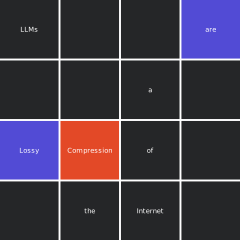
Edit the colour grid in Cell 2, then run Cell 3 to preview.
Run Cell 4 to export as a print-ready PDF.
Palette: - I = #524BD5 indigo - G = #3C8662 pine green - Y = #F6D148 gold - R = #E34927 vermillion - K = #252628 dark grey (off)
import sys, randomfrom pathlib import Pathfrom IPython.display import SVG, display, HTMLsys.path.insert(0, '.')from generate_postcards import WORDS, FONT, WHITE# ── palette shortcuts ─────────────────────────────────────────────────────────I ='#524BD5'# indigoG ='#3C8662'# pine greenY ='#F6D148'# goldR ='#E34927'# vermillionK ='#252628'# dark greydef render(cell_colors, seed=42, tile=61, gap=2):""" cell_colors : list[str] of length 16, indexed by grid cell (row*4 + col). Top-left = index 0, bottom-right = index 15. seed : controls which 8 cells get words and in what order. """assertlen(cell_colors) ==16, 'Need exactly 16 colours' rng = random.Random(seed) cells =list(range(16)) rng.shuffle(cells) word_cells =sorted(cells[:8]) cell_to_word = {cell: WORDS[rank] for rank, cell inenumerate(word_cells)} S = tile *4+ gap *3 fs =max(7, tile //8) parts = [f'<svg xmlns="http://www.w3.org/2000/svg" width="2.5in" height="2.5in"'f' viewBox="0 0 {S}{S}">',f' <rect width="{S}" height="{S}" fill="{WHITE}"/>',' <defs><filter id="ts">',' <feDropShadow dx="0" dy="0.6" stdDeviation="0.8"',' flood-color="#000" flood-opacity="0.22"/>',' </filter></defs>', ]for cell inrange(16): col, row = cell %4, cell //4 x, y = col * (tile + gap), row * (tile + gap) fill = cell_colors[cell] parts.append(f' <rect x="{x}" y="{y}" width="{tile}" height="{tile}" fill="{fill}"/>')if cell in cell_to_word: cx, cy = x + tile /2, y + tile /2 parts.append(f' <text x="{cx:.1f}" y="{cy:.1f}" text-anchor="middle"'f' dominant-baseline="central" font-family="{FONT}"'f' font-size="{fs}" font-weight="500" fill="{WHITE}"'f' filter="url(#ts)">{cell_to_word[cell]}</text>' ) parts.append('</svg>')return'\n'.join(parts)def color_grid(cell_colors):"""Show a quick colour-only preview of the 4×4 layout.""" rows = []for r inrange(4): cells =''.join(f'<td style="width:48px;height:48px;background:{cell_colors[r*4+c]};'f'border:2px solid white;"></td>'for c inrange(4) ) rows.append(f'<tr>{cells}</tr>') display(HTML(f'<table style="border-collapse:collapse;margin-bottom:8px">{" ".join(rows)}</table>'))print('ready — edit Cell 2 then run Cell 3')
ready — edit Cell 2 then run Cell 3
# ── EDIT HERE ────────────────────────────────────────────────────────────────# Layout mirrors the printed grid: row 0 = top, col 0 = left.# Use the single-letter shortcuts: I G Y R K# col0 col1 col2 col3row0 = [ K, K, K, I ]row1 = [ K, K, K, K ]row2 = [ I, R, K, K ]row3 = [ K, K, K, K ]cell_colors = row0 + row1 + row2 + row3SEED =43# change to reshuffle word positions# ─────────────────────────────────────────────────────────────────────────────
# ── preview ───────────────────────────────────────────────────────────────────color_grid(cell_colors) # quick colour-only layoutsvg = render(cell_colors, seed=SEED)display(SVG(svg)) # full render with words